

Public API keys and the API gateway
Create StoreOS API keys in the console, call the public gateway at api.storeos.dev with x-storeos-key, and review recent API call logs for your store.
What this is for
All public StoreOS API access goes through the API gateway at https://api.storeos.dev. You authenticate with a public API key from the merchant console.
| Piece | Role |
|---|---|
| API key | Identifies your store and allowed access (storefront:…, core:…) |
| API gateway | Checks the key, then proxies to storefront or core |
| Customer / admin JWT | Still goes in Authorization: Bearer … when a user is signed in |
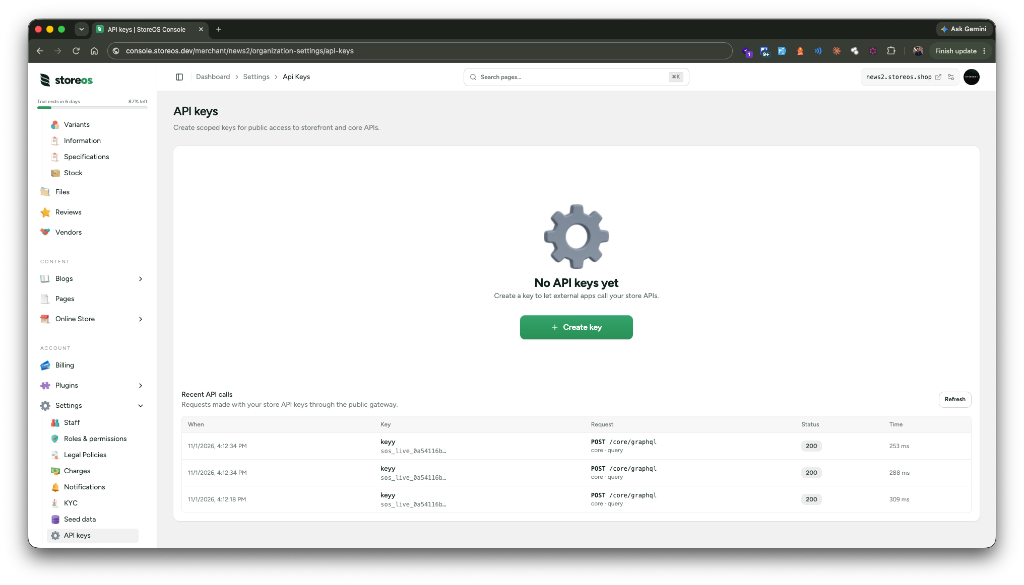
Create and revoke keys under Organization settings → API keys. The same page shows Recent API calls for traffic that used your keys.
Create a key
- Open your store in the StoreOS console.
- Go to Organization settings → API keys.
- Choose Create key, give it a name, and pick scopes.
- Copy the secret immediately — StoreOS shows the full key once.
The key looks like sos_live_…. After creation you only see a short prefix in the list (for example sos_live_a1b2c3d4…).
Scopes
For each service, choose Off, Query (reads), Mutation (writes), or All.
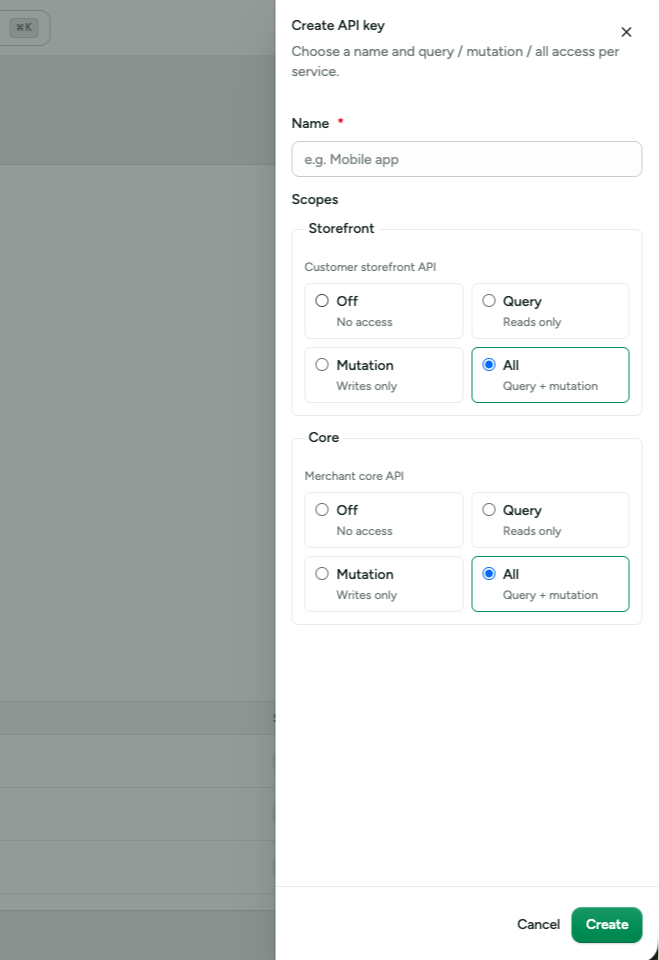
| Scope | Allows |
|---|---|
storefront:query | Read-only storefront GraphQL / REST |
storefront:mutation | Storefront writes (checkout, auth mutations, …) |
storefront:all | All storefront operations |
core:query | Read-only core GraphQL |
core:mutation | Core writes |
core:all | All core operations |
Give each integration the least access it needs. Revoke a key from the same page if it is leaked or no longer used.
Call the gateway
Base URL:
https://api.storeos.dev| Service | Path prefix | Example |
|---|---|---|
| Storefront REST | /storefront | https://api.storeos.dev/storefront/api/v1/products |
| Storefront GraphQL | /storefront/graphql | https://api.storeos.dev/storefront/graphql |
| Core GraphQL | /core/graphql | https://api.storeos.dev/core/graphql |
Browse without a key (Swagger UI, GraphQL Playground shell, and schema introspection). Try-it-out / data queries still need x-storeos-key:
| Explorer | URL |
|---|---|
| Storefront Swagger | api.storeos.dev/storefront/docs |
| Storefront GraphQL Playground | api.storeos.dev/storefront/graphql |
| Core GraphQL Playground | api.storeos.dev/core/graphql |
Headers
| Header | Required | Purpose |
|---|---|---|
x-storeos-key | Yes | Your API key (sos_live_…) |
Authorization: Bearer <jwt> | When needed | Customer or admin user session — not the API key |
Content-Type: application/json | For JSON bodies | GraphQL and REST writes |
The gateway sets the store (x-tenant) from the key. Do not put the API key in Authorization.
REST example
curl "https://api.storeos.dev/storefront/api/v1/products?limit=12" \
  -H "x-storeos-key: sos_live_YOUR_KEY"
GraphQL example
curl "https://api.storeos.dev/storefront/graphql" \
  -H "x-storeos-key: sos_live_YOUR_KEY" \
  -H "Content-Type: application/json" \
  -d '{"query":"{ products(input: { limit: 3 }) { nodes { title } } }"}'
TypeScript SDK
import { StoreFront } from "@storeos/storefront-client";

const store = new StoreFront({
  tenant: "your-tenant-uid",
  apiKey: process.env.STOREOS_API_KEY!, // sos_live_…
  // baseUrl defaults to https://api.storeos.dev/storefront
});

const { nodes } = await store.getProducts({ limit: 12 });Recent API call logs
On Organization settings → API keys, the Recent API calls table lists gateway requests that used your store’s keys (see the screenshot above).
Each row shows:
- When the call happened
- Which key (name + prefix)
- Method and path
- Upstream service and operation (
query/mutation) - HTTP status and duration
Logs refresh automatically and keep recent traffic (about two weeks). Use them to confirm an integration is hitting the gateway, to spot failed calls (4xx / 5xx), and to see which key was used.
Good practices
- Store keys in server env vars or a secrets manager — never in a public frontend bundle.
- Prefer
storefront:queryfor read-only catalog bots; use:mutationor:allonly when writes are required. - Rotate by creating a new key, updating the integration, then revoking the old one.
- Keep customer JWTs in
Authorization; keep the StoreOS key inx-storeos-key.
Related docs
| Topic | Docs |
|---|---|
| Getting started | Getting started |
| Storefront REST routes | REST API |
| Storefront GraphQL | GraphQL API |
| Custom admin on core | Admin dashboard guide |
| SDK setup | Storefront client |
StoreOS phone OTP authentication
Passwordless customer login with an SMS code on StoreOS: how phone OTP is requested, checked, and turned into a session.
Build a custom admin dashboard
High-level guidelines for building a merchant admin app like the StoreOS console — overview, orders, inventory, stock, staff, customers, and more on the public API gateway.